IntelliJ Plugin
Open reports from your IDE
Open any Kensa test report in your browser directly from IntelliJ IDEA.
- Gutter icons on test functions
- Links in test console output
- Test toolbar actions
// Acceptance testing for Kotlin and Java
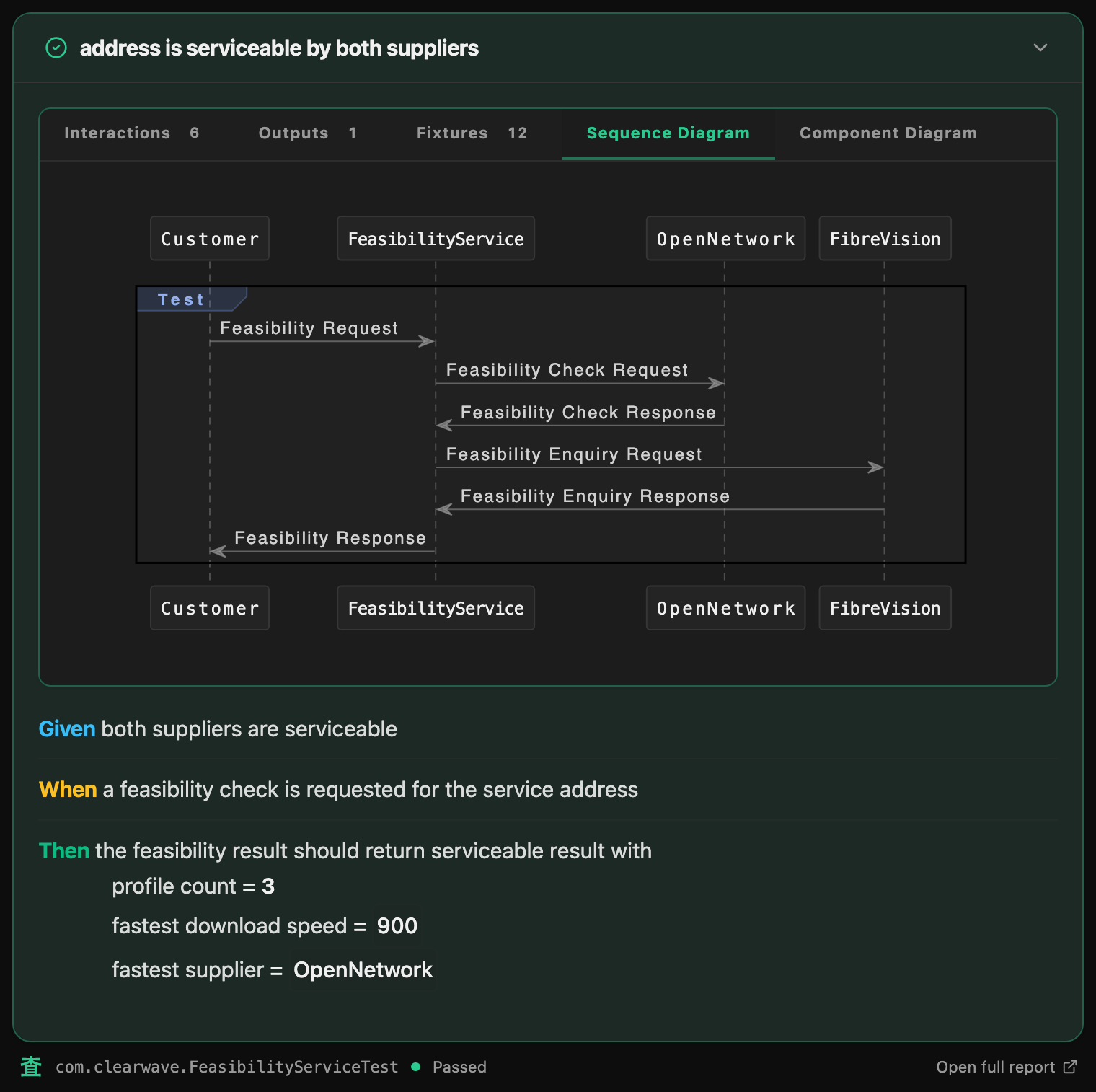
Given, When, Then in the test. Nothing else to keep in sync. The report is generated from the test that ran, with real values, every message between services, and an interactive sequence diagram.
// See it in action
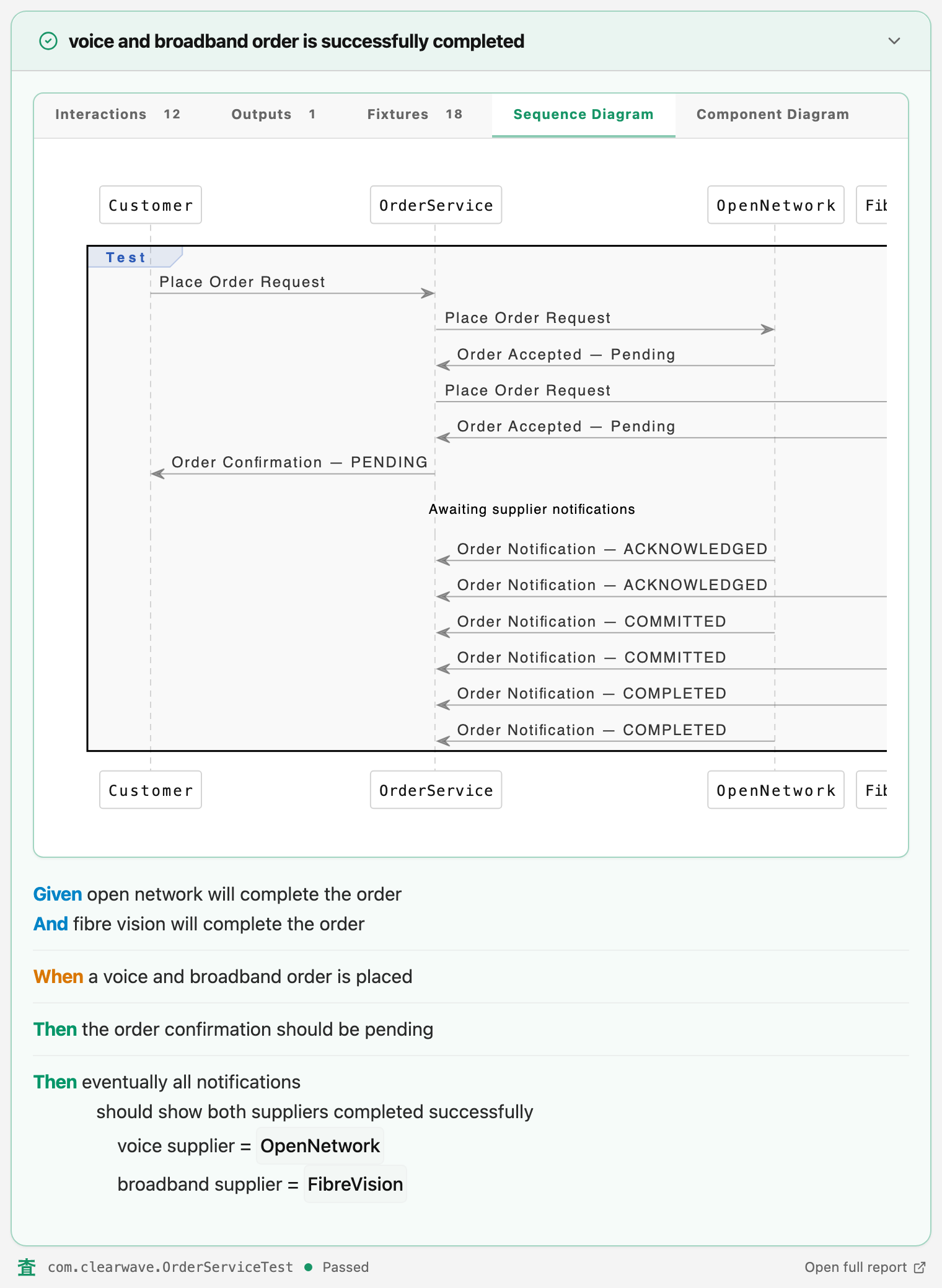
A real test from the Clearwave example, in Kotlin or Java, and the report it produced, embedded live from the latest run. The method names become the words; the values come from the run.
No .feature files. No step definitions. No glue to keep in sync. The test is the spec. The report is the evidence.
@Test
fun `voice and broadband order is successfully completed`() {
    given(openNetworkWillCompleteTheOrder())
    and(fibreVisionWillCompleteTheOrder())

    whenever(aVoiceAndBroadbandOrderIsPlaced())

    then(theOrderConfirmation(), shouldBePending())
    thenEventuallyAllNotifications(
        shouldShowBothSuppliersCompletedSuccessfully(
            voiceSupplier = fixtures[voiceSupplier],
            broadbandSupplier = fixtures[broadbandSupplier],
        )
    )
}
@Test
void voiceAndBroadbandOrderIsSuccessfullyCompleted() {
    given(openNetworkWillCompleteTheOrder());
    and(fibreVisionWillCompleteTheOrder());

    whenever(aVoiceAndBroadbandOrderIsPlaced());

    then(theOrderConfirmation(), shouldBePending());
    thenEventually(Duration.ofSeconds(10), allNotifications(), shouldShowBothSuppliersCompletedSuccessfully(
        fixtures(VOICE_SUPPLIER),
        fixtures(BROADBAND_SUPPLIER)
    ));
}
// Install
The dependencies alone give you the sentences, every captured message and the sequence diagram. The Gradle plugin adds the Kotlin compiler plugin behind @RenderedValue and @ExpandableSentence, and site mode across sourcesets. A Java project needs only the dependencies.
plugins {
    id("dev.kensa.gradle-plugin") version "1.0.0"
}

dependencies {
    testImplementation(platform("dev.kensa:kensa-bom:1.0.1"))
    testImplementation("dev.kensa:kensa-framework-junit6")
    testImplementation("dev.kensa:kensa-assertions-kotest")
}
// Who it is for
Testers, analysts and product owners get a report that says what the system did: Given–When–Then sentences with this run’s real values, every message that crossed between services, and a sequence diagram drawn from them. Open any interaction and read the payload.
Ordinary Kotlin or Java on JUnit 5 & 6, Kotest or TestNG, with the assertions you already use. No feature files, no step definitions, nothing to keep in sync. Refactor and the report follows, because the report is generated from the test that ran.
Built for acceptance tests that sit outside a deployed application. Push a message in, watch what comes out, and let the report show the traffic. Link each test to its ticket with @Issue and the specification, the test and the evidence are one thing.
// Integrations
The report is static HTML, so any CI can publish it. These go further.
Open any Kensa test report in your browser directly from IntelliJ IDEA.
Embed Kensa reports, GWT test names, and failure narratives directly in TeamCity builds.
Site mode aggregates every module’s reports into one browsable site, published from CI.